
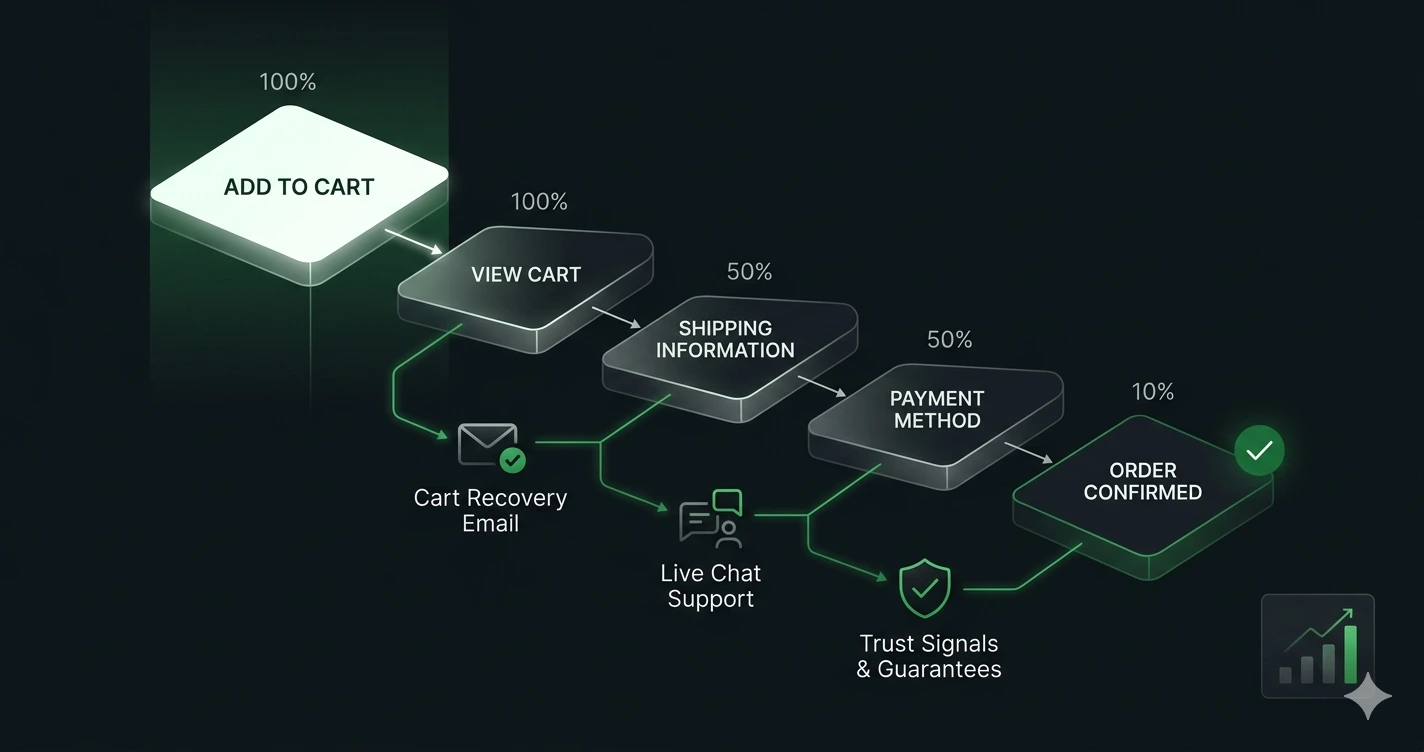
The three changes that reduce cart abandonment fastest: show the full cost — shipping, tax, fees — before the checkout, offer guest checkout, and cut the form to the fields you genuinely need. They address the largest measured drivers directly: Baymard Institute puts extra costs at 40% of abandonment and a required account at 18%.
Cart abandonment rate sits at 70.22% globally. That means for every 10 people who add something to their cart, 7 leave without paying. For most stores, this is the single largest source of recoverable revenue — bigger than any traffic campaign, bigger than any homepage redesign.
The good news is that most of that abandonment isn’t shoppers deciding they don’t want the product. Baymard Institute’s research, aggregated across 50 studies and hundreds of millions of sessions, shows the leading causes are all operational: unexpected costs, friction in the checkout flow, trust concerns at payment. These are fixable problems.
This guide covers 12 tactics to reduce abandonment and recover the revenue that’s already slipping through. They’re ordered by impact — start at the top.
Why Do Shoppers Actually Abandon Carts?
Before the tactics, it helps to understand exactly what you’re solving for. According to Baymard Institute, the top reasons shoppers abandon (among those who actually intended to buy) are:
- 40% — Extra costs too high (shipping, taxes, fees appearing late)
- 20% — Delivery was too slow
- 19% — Didn’t trust the site with credit card information
- 18% — Site required account creation
- 17% — Checkout process too long or complicated
- 16% — Couldn’t calculate total order cost upfront
- 13% — Website errors or crashes
Notice what’s absent from that list: product dissatisfaction, price objections, or better alternatives. The majority of preventable abandonment is caused by your checkout, not your product.
There’s also a segment worth acknowledging: Statista data shows that 58% of abandoners say they were just browsing, 37% were comparing prices, and 24% were waiting for a sale. These visitors weren’t ready to buy on that session regardless of what you do to the checkout. Some percentage of your abandonment rate will always be them — and that’s normal.
The Psychology Behind the Numbers
Understanding two behavioral mechanisms makes the tactics below click into place.
Pain of paying. Behavioral economics research identifies a genuine cognitive friction point that activates when shoppers see the final total. When that total includes costs they didn’t anticipate, the perceived value of the items drops relative to the financial hit — and closing the tab becomes the rational response. The fix isn’t discounting. It’s showing the full cost early enough that the number feels normal by the time they reach payment. A shopper who sees “€90 + €6 shipping” on the product page doesn’t experience surprise at €96 in checkout.
Cognitive overload. Every additional form field, every decision point, every navigation element still visible in the checkout flow consumes mental energy. When that load exceeds the perceived effort of completing the purchase, abandonment happens — not because the shopper changed their mind, but because finishing feels harder than stopping. Removing navigation from checkout pages and cutting form fields to the minimum consistently reduces abandonment. You’re not making checkout more appealing; you’re making quitting feel like more work.
12 Tactics to Reduce Cart Abandonment
1. Show Shipping Costs Before Checkout Begins
Unexpected shipping costs are responsible for nearly half of all abandonment. The fix is transparency — show the full cost early.
Specifically: display your shipping cost (or free shipping threshold) on product pages, in the cart, and in a persistent header or banner if you offer free shipping above a threshold. A message like “Free shipping over €50 — you’re €7 away” on the product page means the checkout total doesn’t feel like a surprise.
The psychological hit from surprise shipping is wildly disproportionate to the actual amount. €4.99 appearing late in checkout causes far more abandonment than the same €4.99 shown on the product page. The number is identical. The timing is everything.
2. Enable Guest Checkout as the Default Option
A required account causes 18% of cart abandonment. This is the second-largest single driver, and it’s entirely preventable.
Make guest checkout the primary option — place it first, or make it visually equal to or more prominent than registered checkout. The compromise that works: invite account creation after the order confirmation. At that point, the shopper has already bought. Creating an account just saves their order history and earns them faster checkout next time. That’s a genuinely easy sell. Requiring it before checkout is a wall.
3. Simplify Your Checkout to Under 14 Form Fields
Baymard’s research puts the average checkout at 23.48 form elements and 14.88 form fields for a new, non-account customer. A fully optimised flow can run as short as 12 form elements and 7 fields — enough to complete the transaction, not enough to create overload.
Go through your checkout form and ask about every field: “Would we lose the sale without this right now?” Phone number for a non-phone business: no. Company name for B2C: no. Birthday: no. Address line 2 without a postcode lookup: no. Each removed field measurably increases completion rate. One study found reducing from 14 to 8 fields increased completion by 31%.
Also: use postcode/ZIP lookups to autofill city and state fields. Don’t make users type what you can infer.
4. Add a Free Shipping Progress Bar to the Cart
If you offer free shipping above a threshold, show a cart-level progress bar. Something like: “You’re €12 away from free shipping — add anything to qualify.”
This tactic does double duty. It directly reduces abandonment from shipping cost friction AND increases average order value, because shoppers near the threshold frequently add a low-cost item to qualify. In most implementations, it’s among the highest-ROI cart optimizations available — consistently positive across different store types and AOV ranges.
5. Place Trust Signals Directly at Payment
Payment anxiety is a real and documented cause of abandonment. The solution isn’t a generic “secure checkout” badge in the footer — it’s placing specific trust signals at the exact moment of maximum anxiety: adjacent to the payment fields and the “Place Order” button.
Effective signals in that location:
- SSL padlock (reinforce what the browser already shows)
- Payment provider logos (Visa, Mastercard, PayPal, Stripe, Apple Pay)
- A short line of copy: “Your information is 100% secure”
- Money-back guarantee badge if you offer one
- TrustPilot or Google review rating if you have one
The position matters more than the design. These signals reduce abandonment when placed next to payment — not above the fold, not in the footer, but right where the shopper is deciding whether to hand over their card details.
6. Offer Multiple Payment Methods
Shoppers have strong and varied payment preferences. Research shows adding PayPal alongside credit cards typically lifts checkout conversion by 10–15%. Apple Pay and Google Pay are increasingly table-stakes, particularly on mobile — where typing a 16-digit card number with a touchscreen keyboard is a genuine pain point that costs real sales.
Buy Now, Pay Later (BNPL) options like Klarna or Afterpay show consistent conversion lifts of 20–30% in categories with higher price tags. Shoppers who wouldn’t commit to €250 upfront will often complete the purchase when they can split it into four instalments.
One rule: don’t add payment options without testing them. Adding too many choices can introduce decision paralysis. Add the two or three your specific audience actually uses.
7. Strip Navigation from Checkout Pages
Every link in your checkout that leads outside the funnel is a potential exit. Headers, footers with full navigation, “Continue Shopping” buttons, promotional banners — they all leak revenue.
Checkout pages should contain: your logo (ideally not linked), a progress indicator, the checkout form, and back/next navigation. Nothing else. Remove the main menu. Remove the footer. Remove the chat widget unless it’s specifically for checkout support.
This is one of the most consistent findings in checkout A/B testing: distraction-free checkouts outperform standard checkouts. Removing navigation from checkout is a one-hour technical change with a measurable conversion impact.
8. Fix Checkout Page Load Speed
Checkout pages are often the last to get performance attention. That’s backwards. A 1-second delay in mobile load time causes a measurable drop in conversion rate, and checkout pages carry the highest purchase intent of any page on your site.
Target: under 2 seconds to interactive on mobile. Specific checkout fixes:
- Lazy load any images that appear below the fold
- Defer all non-critical JavaScript (analytics, chat widgets, retargeting pixels)
- Preload shipping rate calculator API responses so they don’t block interaction
- Use a CDN for all static assets
- Minimize third-party scripts — every external call adds latency
Run your checkout through PageSpeed Insights and treat anything below 80 on mobile as an emergency.
9. Enable Persistent Carts
If a shopper adds to cart on Tuesday and comes back on Thursday — common for furniture, electronics, and anything with a longer consideration phase — is their cart still there?
Persistent carts save cart contents for 7–30 days. They remove the friction of re-finding and re-adding products for multi-session buyers. Most major ecommerce platforms support this with a setting change or minor configuration. The impact is highest in high-ticket categories where the buying decision naturally spans multiple sessions.
Recovery: Winning Back Abandoners
Prevention reduces the rate. Recovery recaptures the revenue that still slips through.
10. Set Up a 3-Email Abandoned Cart Sequence
If you capture email before abandonment — through email-first checkout, account creation, or an email capture on the cart page — an automated email sequence is your highest-ROI recovery channel.
According to Klaviyo’s abandoned cart benchmark data, abandoned cart flows generate $3.65 revenue per recipient — the highest of any automated email type. Open rates average 50.5%, with top performers reaching 65%.
The sequence that works:
Email 1 — 1 hour after abandonment Subject line: “You left something behind” Content: Show the abandoned cart items with product images and a direct link back to checkout. No discount. Many abandoners genuinely just got distracted — this email catches them while intent is still high.
Email 2 — 24 hours after abandonment Subject line: “[Product name] is still in your cart” Content: Remind them of what they left, add a line addressing a common objection (returns policy, delivery speed, security). Light social proof if relevant.
Email 3 — 72 hours after abandonment Subject line: “Last chance — your cart expires soon” Content: Urgency plus your strongest incentive. If you’re offering a discount, this is where it goes — not in Email 1. Offering a discount immediately trains shoppers to abandon on purpose to trigger the coupon.
This sequence typically recovers 5–15% of abandoned carts. On a store losing 840 carts per month, recovering 10% is 84 additional completed orders.
11. Use Exit-Intent Overlays on Cart and Checkout Pages
When a user’s cursor moves toward the browser’s navigation bar or back button, exit-intent technology can trigger an overlay before they leave.
On the cart page, effective exit-intent content:
- Address the most common objection: “Free returns on all orders” or “Free shipping — you’re €8 away”
- Offer cart saving via email: “Save your cart and finish later”
- A discount code as a last resort: “Here’s 10% off — just for you”
One important caution: discount-first exit-intent trains visitors to abandon carts intentionally to get the code. Use friction-removing messages first and reserve discounts for situations where you’re otherwise going to lose the sale completely.
Test the trigger sensitivity carefully — overlays that fire too aggressively on normal scrolling behavior hurt UX and increase bounce rate.
12. Retarget Abandoners with Dynamic Product Ads
Dynamic retargeting — showing abandoners ads featuring the exact items they left in their cart — is one of the highest-ROI digital advertising tactics available for ecommerce.
These are warm audiences who have demonstrated explicit purchase intent. Typical ROAS for cart abandonment retargeting runs 5–10× in Google Ads and Meta Ads.
Set up the audience: users who visited your /cart or /checkout page but did NOT reach your /thank-you or order confirmation page. Run dynamic ads featuring the specific products they viewed, with your strongest purchase incentive. Set a frequency cap of 15–20 impressions over 7 days — beyond that, you’re spending money on people who’ve decided not to buy.
Advanced Recovery: Multi-Channel Sequences
Email is the anchor, but it only reaches people who gave you their address. The full recovery stack goes wider.
SMS. Text message open rates sit at 98% compared to ~50% for abandoned cart email. SMS recovery messages work best as a supplement to email — send a text reminder 2–4 hours after abandonment for high-value cart abandoners (€100+). Keep it short: show the product name, link to cart, and one incentive if relevant.
Browser push notifications. For anonymous abandoners who haven’t shared their email, browser push is your only direct channel. Opt-in rates are 10–15%, but for opted-in users, push notifications can match email recovery rates. Most major ecommerce platforms and tools like OneSignal support cart abandonment push with minimal setup.
Personalized messaging. Generic “You left something behind” subject lines work. Personalized ones work better. Use the product name, the category, and if possible the abandonment stage — someone who got to the payment page and stopped is a different audience than someone who added to cart and didn’t start checkout. Klaviyo, Drip, and Omnisend all support segmented abandonment flows based on funnel stage.
Tools for Diagnosing Abandonment
Before optimizing, you need to know exactly where and why abandonment is happening in your specific store.
Funnel analysis. GA4’s Funnel Exploration report shows drop-off at each checkout step. Set up the funnel: view_item → add_to_cart → begin_checkout → purchase. Look for the largest drop — that’s your biggest lever. Segment by device: mobile and desktop abandonment often have entirely different causes.
Session recording tools. Tools like Microsoft Clarity (free), Mouseflow, or Hotjar let you watch actual checkout sessions. Look for rage clicks on form fields, hesitation before payment, and rage-clicking on elements that don’t respond as expected. Nothing in analytics tells you this; only recordings do.
Exit surveys. A single-question exit survey on the cart or checkout page — “What stopped you from completing your order?” with four or five answer options — gives you qualitative data that analytics can’t surface. Run it for two to three weeks before you start optimizing, so you’re fixing the actual problem your visitors are reporting, not the one you assume.
Key Metrics to Track
Optimizing without measuring is guessing. These are the numbers to watch:
- Cart abandonment rate — (1 − completed purchases / carts initiated) × 100. Your baseline metric. Full benchmark data →
- Checkout abandonment rate — (1 − orders / checkout starts) × 100. Separates cart-level friction from checkout-level friction.
- Abandoned cart recovery rate — recovered orders / total abandoned carts × 100. Measures how well your recovery stack is working. Industry average: 8–15%.
- Revenue per recovery email — total recovered revenue / total recovery emails sent. Klaviyo benchmark: $3.65.
- Add-to-cart rate — cart adds / sessions × 100. If this is low, the problem is before the cart, not in it.
Review these monthly, not just when you’re actively running tests. Abandonment rates can shift with seasonal traffic changes, new payment options going live, or shipping cost changes — and you want to catch those movements before they compound.
A/B Testing Priorities
Not every tactic on this list will move the needle equally for your store. The way to find out is to test.
The highest-priority tests based on consistent data across industries:
- Guest checkout placement — Test guest checkout as the first option vs. account creation first
- Shipping cost visibility — Test showing shipping on product pages vs. cart-only
- Progress indicator style — Test numbered steps vs. progress bar vs. none
- Exit-intent message — Test discount offer vs. shipping reminder vs. returns policy
- CTA button copy — “Place Order” vs. “Complete Purchase” vs. “Confirm Order” (small change, sometimes meaningful impact)
For each test: run until statistical significance (95%+ confidence), don’t test more than one element at a time per page, and segment results by device. Mobile and desktop users often respond differently to the same change.
What Should You Fix First?
You don’t need all 12 tactics live before you see results. This is the priority order based on ROI:
Week 1 — Quick wins with highest impact:
- Show shipping cost on product pages
- Enable guest checkout as the default option
- Add free shipping progress bar to cart page
Weeks 2–3 — Structural checkout fixes:
- Audit and reduce checkout form fields
- Add trust signals adjacent to payment fields
- Remove navigation from checkout pages
- Add multiple payment methods (PayPal, Apple Pay / Google Pay)
Month 2 — Recovery systems:
- Set up 3-email abandoned cart sequence
- Launch retargeting audiences in Google Ads and Meta
- Test exit-intent overlay on cart page
Ongoing:
- A/B test one checkout element per month
- Review GA4 funnel report weekly
- Run quarterly exit surveys to check abandonment reasons
The math on cart abandonment recovery is consistently more compelling than most store owners expect. A 70% abandonment rate means you’re converting less than a third of the people who already decided they wanted your product. Every tactic above chips away at that number. The first three quick wins alone typically move the rate by 5–8 percentage points — which, depending on your store’s volume, can mean thousands per month from the exact same traffic.
Further reading:
- Cart Abandonment Rate: 2026 Benchmarks and Industry Data — the benchmark data behind the tactics above
- Mobile Conversion Rate Optimization — closing the 12-point mobile gap specifically
- CRO Audit Checklist — the full funnel diagnostic, not just checkout
If you want to know exactly which step in your checkout is costing you the most revenue, a CRO audit will map the drop-off points and give you a prioritized fix list based on your actual data.