
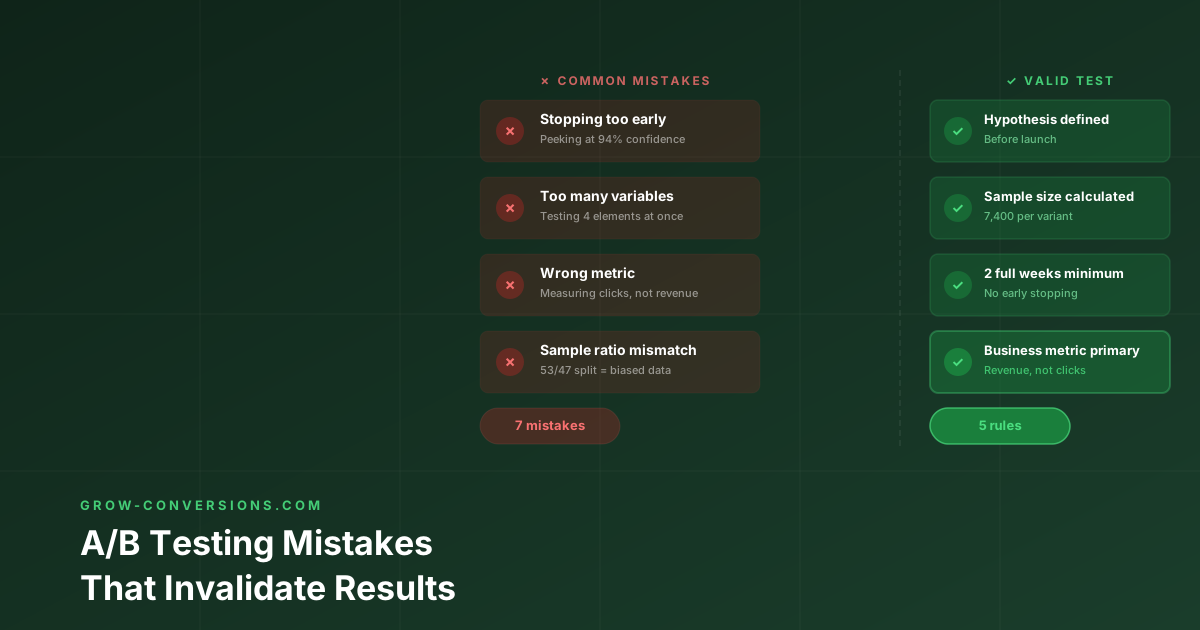
Seven mistakes account for almost every invalidated A/B test: stopping early at first significance, deciding sample size after the fact, testing through abnormal traffic, running overlapping tests on the same pages, ignoring segment effects, editing a variant mid-flight, and never validating the winner in production. Each one is described below with the fix.
I had a conversation with a product manager about six months ago. She was frustrated because her team had been running A/B tests for months, and every single time they shipped a winner, it didn’t hold up in production. She asked me what they were doing wrong.
The answer was simple: almost everything.
I’ve reviewed hundreds of A/B testing programs across e-commerce, SaaS, and B2B companies. The pattern is always the same. Teams aren’t running invalid A/B tests by accident. They’re running them on purpose, without realizing it. They check results every day. They ship the moment they see p less than 0.05. They test five things at once. Then they wonder why their winners disappear after launch.
The good news is that these A/B testing mistakes are completely fixable. But they require discipline, not complexity.
Before you read this, make sure you understand how long to run an A/B test. That’s the foundation everything else builds on.
What Do Invalid A/B Tests Actually Cost?
Here’s what most companies don’t realize. When you ship a false winner, you’re not just wasting time. You’re actually making your product worse. You’ve locked in a change that hurts your users, and you can’t test that area again because you already have a winner. That’s months of lost optimization potential.
One product manager on Reddit described it perfectly. A false winner doesn’t just fail to lift revenue. It locks in a worse experience and stops you from testing that area for months. That’s the real cost.
The seven mistakes I’m about to walk you through are responsible for most of these false winners. Fix these, and your A/B testing program will actually work.
Mistake 1: Stopping the Test as Soon as It Hits Significance
This is the peeking problem, and it’s the most expensive A/B testing mistake I see.
Picture this. It’s Monday. Your A/B test has been running for three days. You check your dashboard. The variant is up 12 percent with 96 percent confidence. You call the team. We have a winner. By Friday, you’ve shipped it.
By the following Wednesday, the lift has vanished.
Here’s why this happens. Every time you check your A/B test results, you increase the probability of seeing a false positive by random chance. Think of it like flipping a coin. If you want to prove the coin is lucky, you could just flip it until you get three heads in a row, then stop. If you keep flipping and only stop when you see that specific pattern, you aren’t measuring the coin. You’re just waiting for a random pattern to appear.
That’s peeking.
A 95 percent confidence level means this: if the null hypothesis is true and the variants are identical, you would see this result 5 percent of the time by random chance. But that 5 percent only applies if you commit to a fixed sample size and stop there. When you peek multiple times, you multiply your chances of seeing a false positive with every check.
Evan Miller’s analysis of repeated significance testing puts a number on it. In his worked example — a 50% baseline conversion rate, stopping at the first significant result or at 150 observations — the false positive rate comes out at 26.1% rather than the 5% you think you are running at. Peek ten times and what your dashboard reports as 1% significance is really 5%. That is the difference between a reliable testing programme and one that is mostly noise.
The fix is straightforward. Calculate your required sample size before the A/B test starts using Evan Miller’s sample size calculator. Write down the number. Write down your stop date. Don’t look at the results until you’ve hit both. This removes the temptation to call it when you see a green spike.
If you absolutely must watch results during a test, use a design built for it. Spotify’s engineering team has written up sequential testing for exactly this reason: a sequential test is constructed so that continuous monitoring does not inflate the false positive rate, where a fixed-horizon test peeked at repeatedly does. The tradeoff is wider confidence intervals early on, meaning A/B tests may take longer to reach significance.
Mistake 2: Testing Too Many Elements at Once
You redesign the headline. You change the hero image. You update the CTA button color. You add social proof. The variant wins by 12 percent. Everyone celebrates.
Six months later, you’re still trying to figure out which of those four changes actually drove the improvement. Spoiler: you never will.
This is noise-driven development. When you change multiple things in an A/B test and the variant wins, you have zero information about what actually moved the needle. When you try to iterate from this, test the next version, build on the winner, you’re building on a foundation you don’t understand. Eventually the optimizations plateau, and you can’t diagnose why.
The problem gets worse when you try to replicate results. You ship the winning variant, but the improvement doesn’t hold. Why? Because you don’t know which of the four changes was actually responsible. Maybe it was the headline. Maybe it was the image. Maybe it was the combination of all four. Now you’re stuck.
There is an exception to this rule. Multivariate testing is designed for testing multiple element combinations simultaneously. But it requires 5 to 10 times more traffic than a standard A/B test and is only suitable for high-traffic pages with 100,000 or more monthly sessions. For everyone else, it’s a trap.
The fix is to isolate your variable. One headline. One CTA. One layout. This isn’t boring. It’s the fastest path to compounding growth. You understand why something works, so you can build on that knowledge. Next month you test something else. The month after that, something else. Over time, these small wins compound into massive improvements.
Mistake 3: Not Accounting for Day-of-Week Effects
Your A/B test runs Monday to Friday. The variant shows a clear winner. You roll it out Monday morning. By Wednesday, the improvement has shrunk by half.
This is day-of-week bias, and it’s invisible until you look for it. User behavior varies dramatically by day of week. B2B sites see 30 to 50 percent higher engagement on Tuesday through Thursday. E-commerce spikes on Thursday evening and Sunday afternoon. If your A/B test doesn’t capture a full week on each side, you’ve measured a biased sample.
A 5-day test might be statistically significant in terms of raw sample size, but behaviorally it’s only measuring one type of visitor. You’re not testing your product. You’re testing Monday-to-Friday users.
Here’s the thing about day-of-week effects. They’re not random. They’re predictable. B2B users check email on weekday mornings. E-commerce users shop on weekends. If your A/B test only captures weekday traffic, you’re missing half your user base.
Always run your A/B tests for complete calendar weeks. The minimum is 2 full weeks. Check your analytics for day-of-week CVR variation before launching. If it’s significant, weight your required runtime accordingly. This isn’t negotiable.
Mistake 4: Ignoring the SRM (Sample Ratio Mismatch)
You expect a 50/50 traffic split in your A/B test. Your test shows 52.3 percent control, 47.7 percent variant. You proceed anyway.
This is a Sample Ratio Mismatch, and it’s a red flag that something is broken in your setup. Even a small imbalance like 52/48 instead of 50/50 can indicate that the variants aren’t receiving comparable traffic. Common causes include bot traffic hitting one variant disproportionately, redirect issues affecting one URL, caching serving one variant more frequently, or mobile versus desktop rendering differently for each variant.
An SRM can invalidate your entire A/B test because the populations being compared are no longer equivalent. You’re not comparing apples to apples. You’re comparing apples to a different type of apple.
Here’s why this matters. If one variant is getting more bot traffic, your conversion rate is artificially inflated or deflated. If one variant is cached differently, some users see a faster loading experience. If mobile and desktop render differently, you’re comparing two different products.
Check for SRM before analyzing your A/B test results. Use a Chi-squared test on your traffic split. Any A/B testing tool should flag this automatically. If your p-value for the traffic ratio is under 0.05, your test has an SRM problem. Investigate the cause before reading results. Don’t try to save the data. Rerun the test.
Mistake 5: Running Tests on Polluted Traffic
Your A/B test includes internal team traffic. It includes bot traffic. It includes QA sessions. The sample size looks healthy. The results are noise.
When your team clicks through the test during QA, they generate sessions that don’t represent real customer behavior. Bot traffic creates artificial session counts without conversion intent. Both inflate your denominator and dilute real conversion signals.
Think about what happens. You have 10,000 sessions. 500 of them are from your team or bots. That’s 5 percent of your data that’s garbage. Your conversion rate is now 5 percent lower than it should be. Your A/B test is now 5 percent less powerful.
Signs your A/B test data is polluted: CVR is wildly inconsistent day-to-day. Traffic spikes that don’t correlate with any campaign activity. Suspiciously high bounce rates on specific variants.
Here’s how to fix it. Filter internal IP addresses in your analytics and testing tool. Enable bot filtering in GA4. Go to Admin, then Data Streams, then Advanced Settings. Exclude known crawler user agents in your testing tool. Run a clean baseline for 2 weeks before launching a test to establish a pollution-free CVR baseline.
Mistake 6: Measuring the Wrong Metric
You optimize for clicks on the CTA button. Clicks go up 18 percent. Revenue stays flat.
This is the proxy metric trap, and it’s one of the most common A/B testing mistakes. Clicks don’t equal conversions. Opens don’t equal revenue. Micro-metrics are useful diagnostics, but they’re not business outcomes. A test that increases CTA clicks by 18 percent but doesn’t move the downstream conversion is measuring the wrong thing.
This mistake is especially common in multipage funnels. A change on page 1 might increase page 2 arrivals, but if page 2 is the friction point, you’ll see a CVR improvement on step 1 and no change in final conversion. You’ve optimized the wrong thing.
Here’s the problem. You ship the change because the dashboard shows a win. But in production, nothing happens. Revenue doesn’t move. Users don’t convert. You wasted weeks on an optimization that doesn’t matter.
Define your primary metric before the A/B test starts. Make it a business outcome like purchase, trial signup, or demo booked. Not a behavioral proxy like click, scroll depth, or time on page. Track secondary metrics as diagnostics, but don’t make shipping decisions based on them.
Mistake 7: Not Running a Pre-Test A/A Test (When Traffic Allows)
You set up your A/B test. You split traffic 50/50 between identical pages. And the variant wins by 8 percent with 91 percent confidence. You didn’t notice. You launched the real test. You trusted results that were already poisoned.
An A/A test sends equal traffic to two identical variants. It should show no significant difference. If it does, your testing setup is broken. The tracking pixel fires differently on each variant. The randomization algorithm is biased. Or there’s a technical implementation error.
If your A/A test shows a winner, your A/B test results cannot be trusted until the underlying issue is fixed.
Here’s why this matters. If your A/A test shows a false winner, that means your testing infrastructure is broken. Every A/B test you run after that is suspect. You could be shipping false winners left and right without realizing it.
Run an A/A test for 1 week before any major test program launches. Or after setting up new testing infrastructure. If it shows a significant result, debug before continuing. This step is skipped by the vast majority of teams. And it’s why so many winning A/B tests fail to hold in production.
The P-Hacking Problem: Why Running Many Tests Guarantees False Positives
Here’s a statistical reality that most teams ignore. If you run 20 A/B tests with a true effect size of zero, on average one of them will show statistical significance at p less than 0.05 purely by random chance.
This is called p-hacking or the multiple comparisons problem. It’s especially dangerous for teams running lots of A/B tests without proper statistical controls. Many product teams are unknowingly p-hacking their way to false winners.
Think about what happens in a typical company. You run 20 A/B tests per month. By random chance, one of them will show significance even if there’s no real effect. You ship it. It fails in production. You wonder why.
The fix is simple but requires discipline. Either run fewer A/B tests and make each one count, or use statistical corrections like Bonferroni correction when running multiple simultaneous tests. If you’re running 2 to 3 concurrent tests on different pages, you’re fine. If you’re running 20 or more tests per month, you need to adjust your statistical significance threshold downward.
How to Diagnose A/B Test Problems Before You Read Results
Before you look at CVR numbers, run through this diagnostic checklist. Most A/B test failures are detectable at setup, not after the fact.
| Symptom | Likely Mistake | How to Confirm |
|---|---|---|
| Winner doesn’t hold after shipping | Stopped too early or day-of-week bias | Did you hit pre-planned sample size? Did test run 2 or more full weeks? |
| Multiple things changed, can’t attribute the win | Testing multiple elements | Review change log. Was it really one variable? |
| CTR up, revenue flat | Wrong primary metric | Is your primary metric a business outcome or a proxy? |
| Traffic split is 53/47 instead of 50/50 | Sample Ratio Mismatch | Chi-squared test on the split. SRM confirmed if p less than 0.05 |
| CVR varies 3 to 5 times between days | Polluted traffic | Compare bot versus human sessions. Check internal IP filtering |
| A/A test shows a winner | Broken testing infrastructure | Randomization or tracking error. Fix before any real test |
A/B Testing Mistakes: Quick Reference
| Mistake | Risk Level | Symptom | Fix |
|---|---|---|---|
| Stopping at significance | Very High | False winners | Pre-calculate sample size, commit to it |
| Testing multiple elements | High | Can’t replicate results | One variable per test |
| Ignoring day-of-week effects | High | Results don’t hold post-launch | Minimum 2 full weeks |
| Ignoring SRM | Very High | Biased population comparison | Chi-squared check on traffic split |
| Polluted traffic | Medium | Noisy, inconsistent results | Filter bots and internal IPs |
| Wrong metric | High | No revenue impact despite winning | Define business outcome upfront |
| No A/A test | Medium | Broken tracking produces false results | Run A/A before major test programs |
What Does a Valid A/B Test Look Like?
A well-run A/B test has five things defined before it launches.
First, a hypothesis. We believe changing X to Y will increase metric Z because reason.
Second, a primary metric. A business outcome, not a click.
Third, a required sample size. Calculated with Evan Miller’s sample size calculator at 95 percent confidence and 80 percent power.
Fourth, a minimum runtime. 2 full business cycles minimum.
Fifth, stopping rules. Pre-committed. Don’t change them mid-test based on early results.
Run the A/B test. Don’t peek. When it finishes, read the result once. Make your decision. Document everything.
That’s it. It sounds boring. It is boring. Boring, rigorous A/B testing produces compound results over time. Exciting, intuition-driven testing produces one good story and a lot of wasted traffic.
Why Do Most Companies Get A/B Testing Wrong?
The reason most companies fail at A/B testing isn’t because the concept is hard. It’s because discipline is hard. It’s easy to check results on day 3. It’s easy to ship when you see a green number. It’s easy to test five things at once.
What’s hard is waiting. Waiting for your pre-planned sample size. Waiting for two full weeks. Waiting for statistical significance instead of just significance.
But that’s what separates companies that actually optimize their products from companies that think they’re optimizing their products.
Resources for A/B Testing
Evan Miller’s A/B Testing Tools - Comprehensive collection of statistical calculators for A/B testing. https://www.evanmiller.org/ab-testing/
Spotify’s Sequential Testing Framework - How to peek at results without inflating false positives. https://engineering.atspotify.com/2023/03/choosing-sequential-testing-framework-comparisons-and-discussions/
Reddit discussion on A/B test wins being fake - Real product managers discussing peeking and false positives. https://www.reddit.com/r/ProductManagement/comments/1snuq6z/a_lot_of_ab_test_wins_are_just_fake/
Trustworthy Online Controlled Experiments - Academic reference by Ronny Kohavi and Diane Tang. https://www.cambridge.org/core/books/trustworthy-online-controlled-experiments/D97B26382EB0EB2DC781F87C461D9F1B
Are Your Tests Set Up to Produce Valid Results?
I review A/B testing programs and give you an honest assessment. What’s producing real signal, what’s noise, and what tests you should actually be running next. Most programs have at least 3 structural issues that are silently invalidating results.
Also read: A/B Testing Best Practices. The full framework for running your first valid test. And Best CRO Tools in 2026. The testing tools worth using, reviewed honestly.
Get a Free CRO Audit at /contact/