
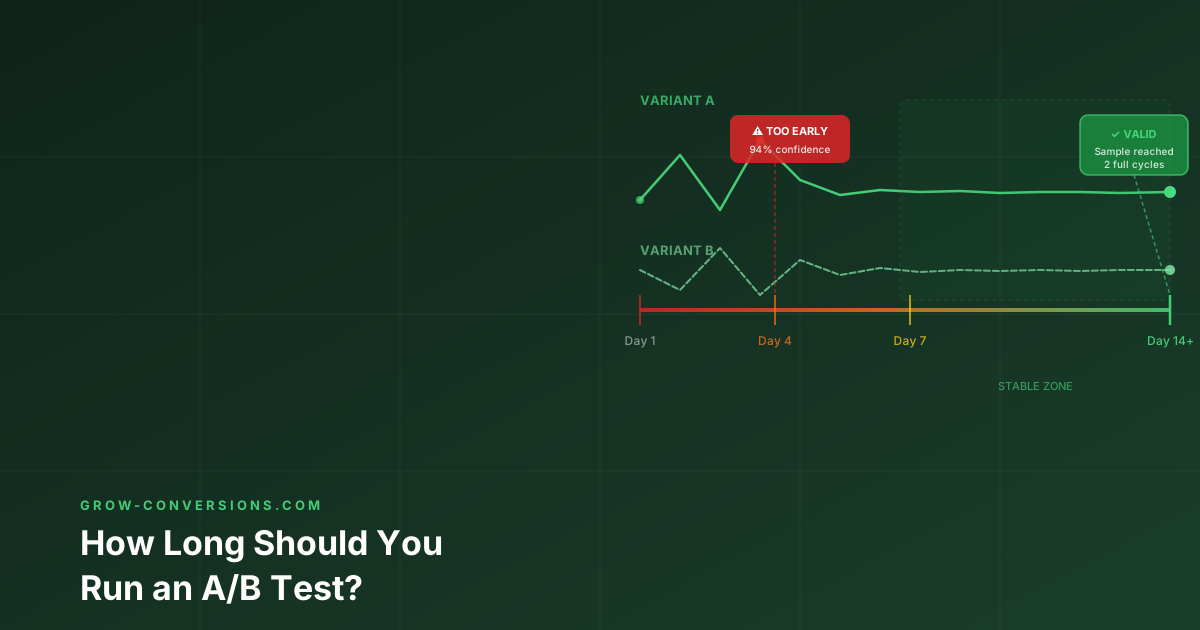
Run an A/B test until it reaches the sample size you calculated before starting, and never for fewer than two full business weeks. Duration is decided by your baseline conversion rate, the smallest effect worth detecting and your traffic volume — not by the moment the dashboard first says “significant”.
You are running an A/B test on your ecommerce checkout page. On day four, the new variant shows a 22% increase in conversions, and your testing dashboard proudly displays “94% statistical significance.” The temptation to stop the test, declare a winner, and roll out the changes is overwhelming.
Do not do it.
Ending an A/B test prematurely is one of the most expensive and common mistakes in conversion rate optimization (CRO). It consistently produces false winners — variants that appear to outperform the control during the test, but fail to deliver any actual revenue lift when deployed to 100% of your traffic. To optimize conversion rates through A/B testing effectively, you need discipline and a strict adherence to testing duration protocols.
This guide provides the definitive framework for calculating exactly how long to run an A/B test, complete with formulas, industry-specific benchmarks (from ecommerce to mobile apps), and the mathematical reasons why patience is your most valuable CRO asset.
The Short Answer: How Long Should an A/B Test Run?
Run your A/B test for a minimum of two full business cycles (typically 14 days), regardless of how quickly it reaches statistical significance.
This two-week rule is the absolute floor, not the ceiling. The actual duration for A/B testing depends heavily on three interconnected factors: your baseline conversion rate, your Minimum Detectable Effect (MDE), and your daily traffic volume.
| Traffic Volume | Recommended Minimum Duration |
|---|---|
| 100,000+ monthly visitors | 2 to 4 weeks |
| 25,000 – 100,000 monthly visitors | 4 to 6 weeks |
| Under 25,000 monthly visitors | 6 to 8 weeks (or shift to micro-conversions) |
Running tests in increments of full seven-day weeks (14 days, 21 days, 28 days) is critical because user behavior fluctuates wildly depending on the day of the week. B2B traffic often plummets on weekends, while ecommerce traffic might spike on Sunday evenings. If you run a test for only 10 days, you are over-representing certain days of the week, which skews your data and pollutes your sample.
The A/B Test Duration Formula (How to Calculate Sample Size)
To determine how to calculate A/B test duration, you cannot rely on guesswork. You must calculate the required sample size before you launch the test, and then divide that number by your daily traffic. Here is the step-by-step methodology used by professional optimizers.
Step 1: Determine Your Baseline Conversion Rate
Before you can measure improvement, you must know your starting point. Pull the current conversion rate for the specific page or funnel step you are testing.
- Use at least 30 days of historical data to establish this baseline.
- Do not use data from just the last 7 days, as it may be influenced by short-term anomalies (like a holiday weekend or a temporary traffic spike).
- Ensure you are measuring the exact metric you plan to test — for example, the click-through rate on a specific CTA button, not the overall site conversion rate.
Step 2: Set Your Minimum Detectable Effect (MDE)
The Minimum Detectable Effect (MDE) is the smallest relative improvement in conversion rate that you care about detecting. Setting the MDE is a business decision, not a purely statistical one.
If your baseline conversion rate is 5% and you set an MDE of 20%, you are telling the testing software that you only care if the new variant achieves a conversion rate of 6% or higher (a 20% relative lift). Setting a low MDE (e.g., 2%) requires a massive sample size and a very long test duration, because small differences are hard to distinguish from random noise. Setting a high MDE (e.g., 30%) requires a smaller sample size and a shorter test duration, but you risk missing out on smaller, yet still profitable, improvements. As a general rule for CRO A/B testing, start with an MDE between 10% and 20% unless you have enormous traffic volumes.
Step 3: Define Statistical Significance and Power
To calculate the required sample size, you must plug your baseline CVR and MDE into a statistical formula, along with two fixed parameters:
- Statistical Significance (Confidence Level): The industry standard is 95% (alpha = 0.05). This means you accept a 5% risk of a false positive — detecting a difference when none actually exists.
- Statistical Power: The industry standard is 80% (beta = 0.20). This means you accept a 20% risk of a false negative — failing to detect a difference that actually exists.
Using these inputs, the mathematical formula for sample size (N) per variation at 80% power is approximately:
N = 16 × (Standard Deviation / (Baseline CVR × MDE))²
Step 4: Divide by Daily Visitors
Once the formula gives you the required sample size per variation, multiply it by the number of variations (including the control) to get the total required traffic. Then divide by your average daily unique visitors to the tested page.
Test Duration (Days) = (Required Sample Size per Variant × Number of Variants) / Daily Unique Visitors
Example: If you need 10,000 visitors per variant (20,000 total for a standard A/B test) and your page receives 1,000 unique visitors per day, your test duration is 20 days. Since you must run tests in full-week increments, round this up to 21 days (3 full weeks).
A/B Test Duration Calculator
Want a dedicated page you can bookmark? → A/B Test Duration Calculator · A/B Test Sample Size Calculator
A/B Test Duration Calculator
Find out how long you need to run your test to get reliable results
A/B Test Duration Calculators (Tools Comparison)
You do not need to do the complex math manually. Several reliable statistical significance calculators for A/B testing are available for free online. Each has different strengths depending on your level of expertise.
| Calculator | Best For | Key Feature |
|---|---|---|
| Evan Miller’s Sample Size Calculator | Statisticians and advanced users | Highly visual; shows the MDE–sample size relationship interactively |
| VWO A/B Test Duration Calculator | Marketers and non-technical users | Inputs daily traffic directly; outputs duration in days |
| Convert.com Test Duration Calculator | Teams managing a testing backlog | Shows how adjusting MDE changes the total testing timeline |
| Optimizely Sample Size Calculator | Beginners | Defaults to industry-standard settings; foolproof inputs |
Regardless of which A/B test duration calculator you use, the output is only as good as the inputs. Be realistic about your MDE and your daily traffic figures.
Why Isn’t “Reaching Significance” Enough?
The most dangerous phrase in A/B testing is: “We reached 95% significance in three days, let’s stop the test.”
This is known as the peeking problem, and it fundamentally breaks the mathematics of A/B testing confidence intervals. Statistical significance calculations assume that sample sizes are fixed in advance. When you check your results daily and stop the test the moment it crosses the 95% threshold, you are not doing science — you are cherry-picking the moment the data happened to look good.
According to Evan Miller’s foundational research on how not to run an A/B test, repeatedly checking ongoing experiments drastically inflates your false positive rate. His data shows that if you peek at a test 10 times with the intent to stop it if it looks significant, your actual false positive rate skyrockets from the expected 5% to over 20%. A test checked daily for 14 days has a staggering 54% chance of showing at least one false significant result, even if the A and B variants are completely identical.
“Repeated significance testing always increases the rate of false positives. If you peek at an ongoing experiment ten times, then what you think is 1% significance is actually just 5% significance.” — Evan Miller, HowNotToRunAnABTest.com
To avoid false positives in A/B testing, you must calculate the required sample size before the test begins, commit to that duration, and completely ignore the significance dashboard until the test has run its full course.
A/B Test Duration by Industry and Business Model
The “two weeks minimum” rule is universal, but the maximum duration and practical realities vary wildly depending on your industry and the specific metric you are optimizing.
Ecommerce: Checkout and Pricing Tests
When running A/B testing for ecommerce, traffic is usually high, but the stakes are even higher. The minimum is always two weeks, but specific page types require more.
- Product Page Tests: Tests on product pages (e.g., changing image layouts or adding trust badges) can often reach significance within 2 to 3 weeks due to high traffic volume.
- Checkout Page Tests: Best practices for A/B testing checkout pages dictate longer durations. Because only a fraction of your total traffic reaches the checkout page, the sample size takes longer to build. Expect checkout tests to run for 4 to 6 weeks.
- Pricing Tests: An A/B test for optimal pricing in ecommerce is highly sensitive. Because price changes directly impact revenue per visitor (RPV), you need larger sample sizes to detect smaller MDEs (often 5% or less). These tests frequently require 6 to 8 weeks.
B2B & SaaS: Lead Gen and Free Trials
B2B and SaaS companies face the dual challenge of lower traffic volumes and longer sales cycles. If you are testing a B2B landing page for form submissions, you might only get a few hundred visitors per week. You must increase your MDE (aiming for big wins of 20% or more) and be prepared to run tests for 4 to 6 weeks.
The SaaS A/B test duration for free trial conversions is uniquely complex. If your free trial is 14 days long, your A/B test duration must account for that delay. A user who enters the test on day 1 cannot convert until day 14. Therefore, to get two weeks of clean conversion data, the test must run for at least 4 weeks — two weeks to acquire the sample, plus two weeks for the cohorts to mature.
Mobile Apps: The 7-Day Retention Metric
One of the most critical, yet poorly understood, areas of experimentation is mobile app A/B testing, specifically regarding retention metrics.
What is the typical duration of an A/B test for a 7-day retention rate in apps? The minimum duration is 21 days.
Here is why the math requires three weeks:
- Sample Acquisition (14 days): You need at least two full weeks to gather a representative sample of users, accounting for differences between weekday and weekend download behaviors. Most mobile A/B tests need at least two weeks to account for weekday and weekend behavioral variation.
- Cohort Maturation (7 days): A user who downloads the app on the 14th day of the test cannot be evaluated for 7-day retention until the 21st day.
If you stop an A/B test for 7-day retention before the final cohort has fully matured, your data is incomplete and your retention metrics will look artificially low for the newest users in the variant.
Frequentist vs. Bayesian Testing Models
Most legacy A/B testing tools were built on Frequentist statistics. This model requires you to define your sample size and test duration strictly in advance. Under the Frequentist model, peeking at your results before the test is complete is a cardinal sin that invalidates your data — you cannot make any decisions until the predetermined duration is reached.
Newer testing engines often use Bayesian statistics. Instead of simply telling you if a result is statistically significant, Bayesian models calculate the probability that variant B is better than variant A, and the expected magnitude of that improvement. While Bayesian models are somewhat more resilient to the peeking problem, they do not eliminate the need for a minimum test duration. Even in a Bayesian framework, you must run the test long enough (minimum two weeks) to capture a representative sample of user behavior across all days of the week.
How Traffic Sources Affect Test Duration
Your test duration is also heavily influenced by where your traffic is coming from. Different traffic sources have different baseline conversion rates and behavioral patterns.
- Organic Search (SEO) Traffic: High-intent traffic that accumulates steadily. Tests relying solely on organic traffic often require longer durations (4 to 8 weeks) to reach significance.
- Paid Search (PPC) Traffic: Google Ads traffic is highly targeted and can be scaled quickly. If you increase your ad spend, you can reach your required sample size much faster, potentially concluding a test in exactly 14 days.
- Email Marketing Traffic: Email traffic is highly episodic. You get a massive spike immediately after sending a campaign, followed by a sharp drop-off. Landing page tests driven by email traffic must account for the fact that the sample is not distributed evenly over time.
What If You Don’t Have Enough Traffic?
If your site receives fewer than 10,000 visitors a month, traditional A/B testing becomes mathematically impractical. A test might take six months to reach significance, by which time seasonal shifts and sample pollution will have rendered the data useless.
To continue optimizing conversion rates with low traffic, you must adapt your strategy:
- Test Micro-Conversions: Instead of testing for final purchases (which have a low baseline CVR), test for micro-conversions higher up the funnel, such as “add to cart” clicks or email signups. Because the baseline conversion rate is higher, the required sample size is smaller, drastically reducing the required test duration.
- Increase Your MDE: Stop testing button colors. Only test radical, structural changes — like entirely new page layouts or drastically different offers — where you can reasonably expect a 30% to 50% improvement. A larger MDE requires a much smaller sample size.
- Shift to Qualitative Research: If you cannot reach statistical significance in under 8 weeks, pause A/B testing. Focus your efforts on user testing, heatmaps, session recordings, and customer interviews to find and fix usability issues directly.
For a complete guide on optimizing with low traffic, see How to Do CRO With Low Traffic (Under 1,000 Visitors/Month).
5 A/B Testing Mistakes That Ruin Your Duration Estimates
Even if you calculate your A/B test duration perfectly, execution errors can invalidate your entire timeline.
- Testing Too Many Variants: Every time you add a variant (A/B/C/D), you divide your traffic further. Testing four variants instead of two will roughly double the time it takes to reach significance. Unless you have massive traffic, stick to A/B — one control, one challenger.
- Ignoring Seasonality: Running a 14-day test that overlaps with Black Friday or a major product launch pollutes the sample. The user behavior during that event is not representative of your normal traffic.
- Sample Ratio Mismatch (SRM): If your testing tool is supposed to split traffic 50/50, but you notice a 55/45 split, you have an SRM error. The test is broken, the duration calculation is void, and you must stop and investigate the technical setup before relaunching.
- Stopping at the First Sign of Significance: As discussed above, stopping early guarantees false positives and wasted development resources.
- Running Tests Too Long: Conversely, running a test for 12 weeks is also dangerous. Over long periods, users delete cookies, switch devices, and re-enter the test as “new” visitors, polluting the data and making the results unreliable. If a test takes longer than 8 weeks, your MDE is too small or your traffic is too low.
What Should You Do With an Inconclusive Test?
What happens when your A/B test duration calculation said the test should take 21 days, but on day 21, the results are completely inconclusive? This is a common scenario, and it usually means one of three things:
- Your MDE was too small: The actual difference between the variants is smaller than the Minimum Detectable Effect you set, meaning your sample size was not large enough to detect it.
- The variants are truly identical in performance: Your change had zero impact on user behavior.
- Your test duration was too short for the traffic volume: You did not get enough visitors to prove the hypothesis.
If a test is inconclusive after the planned duration, do not keep running it indefinitely in the hopes that it will eventually reach significance. Stop the test. An inconclusive result is still a result — it tells you that the change you made is not a massive driver of conversions. Document the learning, implement the variant if you prefer it aesthetically (since it does no harm), and move on to a bolder hypothesis with a larger expected impact.
Conclusion
Determining how long to run an A/B test is not a guessing game, nor is it a race to the finish line. It is a mathematical calculation that must be respected to ensure the integrity of your conversion rate optimization program.
Always calculate your required sample size upfront, commit to a minimum of two full business cycles (14 days), and never stop a test early just because a dashboard shows 95% significance. By understanding the nuances of your specific industry — whether you are optimizing an ecommerce checkout, a SaaS free trial flow, or measuring 7-day retention in a mobile app — you can run valid experiments that deliver real, measurable revenue growth, rather than chasing statistical ghosts.
Wondering if your current A/B tests are set up correctly?
A bad test produces bad data. And bad data produces bad decisions — which is worse than no data at all. Our A/B testing service includes a full audit of your current program — what’s valid, what’s producing false positives, and what to test next.
Also read: A/B Testing Best Practices — the full framework for running tests that produce reliable results. And A/B Testing Mistakes for the structural errors that silently invalidate most tests.