
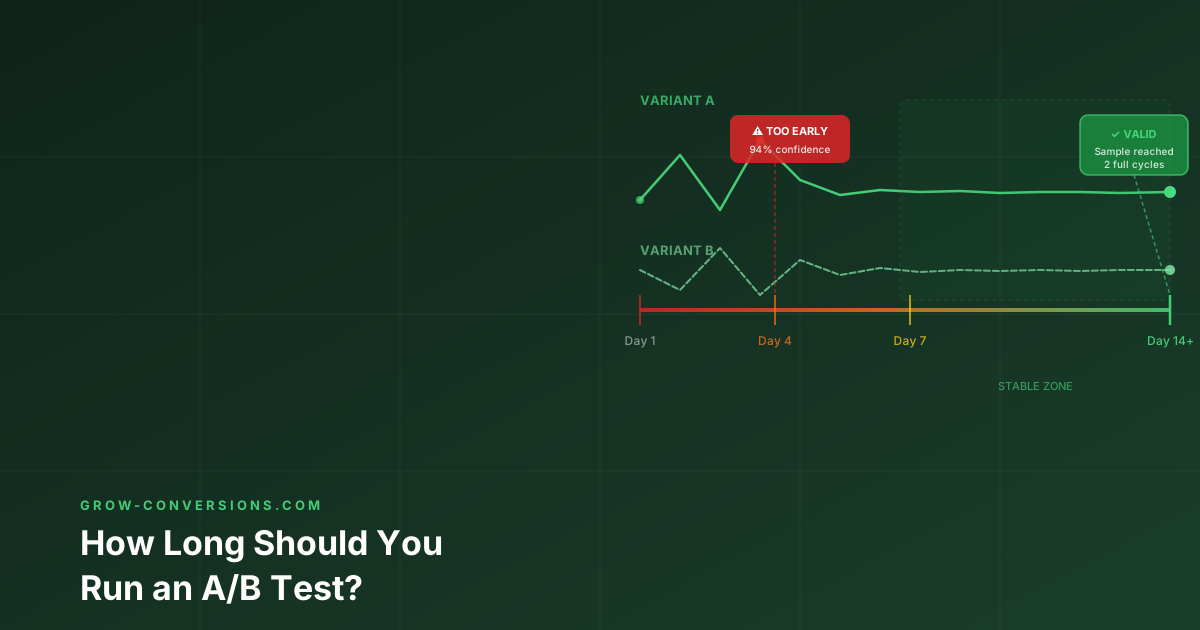
You’re running an A/B test. Day 4, your variant is up 22%. Your dashboard shows 94% confidence. Someone on your team says “that’s basically significant — let’s call it.”
Don’t.
Ending an A/B test early is one of the most expensive mistakes in conversion optimization. It produces false winners — variants that appear to beat the control, then underperform when you roll them out at 100% traffic.
Here’s the exact framework for calculating how long to run your test, and why “it reached significance” is not the green light you think it is.
Already know how long to run tests? Read A/B Testing Mistakes That Invalidate Your Results to make sure your setup is valid before you launch.
The Short Answer
Run your A/B test for a minimum of 2 full business cycles (usually 2 weeks), regardless of when statistical significance is reached.
This is the floor, not the ceiling. The actual minimum depends on your traffic volume, baseline conversion rate, and minimum detectable effect (MDE). More on how to calculate all three below.
Why “It Reached Significance” Isn’t Enough
Statistical significance tells you one thing: the probability that your result isn’t random noise. It does not tell you:
- Whether the result will hold at 100% traffic
- Whether it was influenced by day-of-week effects
- Whether a traffic spike or dip skewed the result
- Whether your sample was representative of your full audience
The peeking problem: When you check your test results daily and stop the moment it reaches significance, you inflate your false positive rate from 5% to over 20%. You’re not reading a result — you’re cherry-picking the moment the data happened to look good.
“The longer you peek, the more likely you’ll see a false positive. A test that was checked daily for 14 days has a 54% chance of showing at least one false significant result — even if the variants are identical.” — Evan Miller, HowNotToRunAnABTest.com
How to Calculate Your A/B Test Duration
Before you launch a test, calculate the required sample size. Then divide by your daily traffic to get the minimum runtime.
Step 1: Define your baseline conversion rate
Pull your current conversion rate for the page or element you’re testing. Use at least 30 days of data. Don’t use the last 7 days — it may not be representative.
Step 2: Define your Minimum Detectable Effect (MDE)
MDE is the smallest improvement you’d consider worth implementing. This is a business decision, not a statistics question.
Rule of thumb by business context:
| Context | Recommended MDE |
|---|---|
| High-traffic e-commerce | 5–10% relative improvement |
| Low-traffic B2B site | 20–30% relative improvement |
| Email subject line test | 2–5% improvement in open rate |
| Checkout optimization | 10–15% improvement in completion |
| Paid landing page | 15–25% improvement in CVR |
Setting MDE too low (e.g., 1%) means you need enormous sample sizes. Setting it too high (e.g., 50%) risks missing real but moderate improvements.
Step 3: Calculate required sample size
Use any of these calculators:
- Evan Miller Sample Size Calculator
- VWO A/B Test Duration Calculator
- Optimizely Sample Size Calculator
Default settings to use:
- Statistical significance: 95% (α = 0.05)
- Statistical power: 80% (β = 0.20)
- Tails: 2-tailed test (unless you are 100% certain the variant can only improve, never hurt)
Step 4: Divide by daily unique visitors to the test
Test Duration (days) = Required Sample Size per Variant ÷ Daily Unique Visitors to Test Element
Example calculation:
- Baseline CVR: 3.2%
- MDE: 15% relative improvement → target CVR: 3.68%
- Required sample size per variant: ~7,800
- Daily unique visitors to the page: 520
- Duration: 7,800 ÷ 520 = 15 days per variant
Since you’re running two variants (control + one challenger), you need 15,600 total visitors minimum — at 520/day, that’s approximately 30 days.
The 2-Week Minimum Rule (And Why It Exists)
Even if your sample size calculation says you only need 5 days, run for at least 2 full weeks.
The reason: Day-of-week effects are real and significant. B2B sites see drastically different behavior on weekdays vs weekends. E-commerce sites spike on Thursdays and Sundays. If your test runs Monday to Friday, you’re only measuring weekday visitors — and your winner may perform differently on Saturday.
Two full weeks ensures each variant sees the same distribution of days at least twice.
Exception: If your site has zero weekend traffic (pure B2B, corporate tool), 10 business days (2 work weeks) is sufficient.
When Can You Stop a Test Early?
There are three legitimate reasons to stop a test before reaching your planned duration:
- The variant is causing measurable harm. Revenue is dropping, bounce rate spiked, or calls to support are increasing. If a variant is clearly hurting you, stopping is the right call. Document why.
- A critical external event occurred. A PR crisis, a major sale, a server outage, or an algorithm update that renders your test data uninterpretable. Stop, record the reason, and relaunch after the event passes.
- You’ve reached planned sample size AND 2-week minimum. Both conditions must be met, not just one.
Never stop because:
- “It looks like the variant is winning”
- “We need to ship this feature”
- “The boss wants to see results”
These are pressure-driven decisions, not data-driven ones. They produce false winners.
How Many Variants Can You Test at Once?
This is where many teams go wrong by running too many variants simultaneously.
| Variants | Required Sample Size Multiplier | Risk |
|---|---|---|
| A/B (1 variant) | 1× | Low |
| A/B/C (2 variants) | 1.5–2× | Medium |
| A/B/C/D (3 variants) | 2–3× | High |
| 4+ variants | 3×+ | Very High (insufficient traffic for most sites) |
Practical rule: If your monthly traffic is under 20,000 sessions, run one variant at a time. Period. Multiple variants fragment your already-limited traffic and produce tests that take months to conclude — or never reach significance.
A/B Test Duration by Traffic Volume
Use this table to estimate minimum test duration based on your monthly traffic and a 3% baseline CVR:
| Monthly Sessions | MDE 20% | MDE 15% | MDE 10% |
|---|---|---|---|
| 5,000 | ~90 days | Impractical | Impractical |
| 10,000 | ~45 days | ~90 days | Impractical |
| 25,000 | ~18 days | ~35 days | ~80 days |
| 50,000 | ~9 days | ~18 days | ~40 days |
| 100,000+ | ~5 days | ~9 days | ~20 days |
Assumes 95% significance, 80% power, 2-tailed test, 50/50 traffic split
The uncomfortable truth for low-traffic sites: If you have under 5,000 sessions/month, classic A/B testing isn’t your tool. More on that in the next section.
What to Do If You Have Low Traffic
Low-traffic sites (under 5,000 sessions/month) have two options:
Option 1: Increase your MDE Accept that you’ll only detect large improvements. Set MDE at 25–40% and only test changes that could plausibly deliver that — major redesigns, new copy angles, removing friction points.
Option 2: Use qualitative methods instead
- Session recordings (Hotjar, Microsoft Clarity): watch how real users behave
- Heatmaps: identify ignored CTAs and rage clicks
- User testing: 5 sessions reveal 80% of usability issues
- Customer surveys: ask why they didn’t convert
These methods give you directional insight without the sample size problem. For a complete guide on optimizing with low traffic, see How to Do CRO With Low Traffic (Under 1,000 Visitors/Month).
Wondering if your current A/B tests are set up correctly?
A bad test produces bad data. And bad data produces bad decisions — which is worse than no data at all. I audit A/B testing programs and give you a plain-English report on what’s valid, what needs to be rethought, and what to test next.
Also read: A/B Testing Best Practices — the full framework for running tests that produce reliable results. And A/B Testing Mistakes for the structural errors that silently invalidate most tests.